Let’s begin with a simple question: We write programs in languages like Java, but computers only understand 0s and 1s. How does this work?
Imagine you speak Tamil, but your friend only understands English. To share your story, you’ll need someone to translate from Tamil to English. Similarly, when we write programs in a language we understand, computers need a translator to turn those instructions into a language they understand. Let’s break this process into simple steps.
The Problem: HLL vs. MLL
When we write programs, we use High-Level Language (HLL) like Java. It’s simple, uses normal words, and is easy for humans to understand. But here’s the twist: computers don’t understand these words. They only understand Machine Language (MLL), which is made of 0s and 1s.
- HLL: Writing instructions in simple steps, like “Boil water”, “Add tea leaves”.
- MLL: Communicating using only beeps and clicks. Imagine saying “Boil water” as “00110101”. Writing in MLL would be that difficult!
So, how do we solve this problem? We use a process to translate HLL into MLL so humans and computers can work together. Let’s see how Java makes this happen.
The Solution: How Java Programs Are Executed
Let’s understand it step by step. Imagine you’re sharing an Instagram reel with a friend. You create the reel (your program) in English, but your friend only understands Tamil. To make sure they enjoy it, you need to translate it into Tamil. Similarly, Java programs are translated step by step so computers can understand them.
- Write the Code (HLL):
This is where you write your program in simple, understandable words, like creating a reel in your favorite editing app.
Example,
public class Main {
     public static void main(String[] args) {
         System.out.println("I will do Coding");
     }
}
- Save the File:
Save your program as a .java file, just like saving your reel to your phone before uploading it. For example, save it as Main.java - Compile the Code:
The compiler acts like a translator. It takes your reel (the .java file) and converts it into a universal language (bytecode) so anyone can enjoy it.
The .java file is converted into a .class file. This .class file is like your reel translated into Tamil but not yet uploaded. - Load the Program:
The Class Loader loads the bytecode into memory, like uploading your reel to Instagram, making it ready for others to see. - Execute the Code (JVM):
The JVM acts like your friend who watches the reel in Tamil, understands it, and enjoys it. It converts the bytecode into 0s and 1s (MLL) that the computer can understand and execute. - See the Output:
Finally, your friend watches the reel and enjoys it (output). For example,
I will do CodingExample Execution
Here’s a real example of how this process works:
- Source Code:
public class Main {
     public static void main(String[] args) {
         System.out.println("Welcome to Spyde's
                             Blog");
     }
}
- Save File: Main.java
- Compile: Run javac Main.java to generate Main.class
- Run the Program: Execute java Main to see the output.
Welcome to Spyde's Blog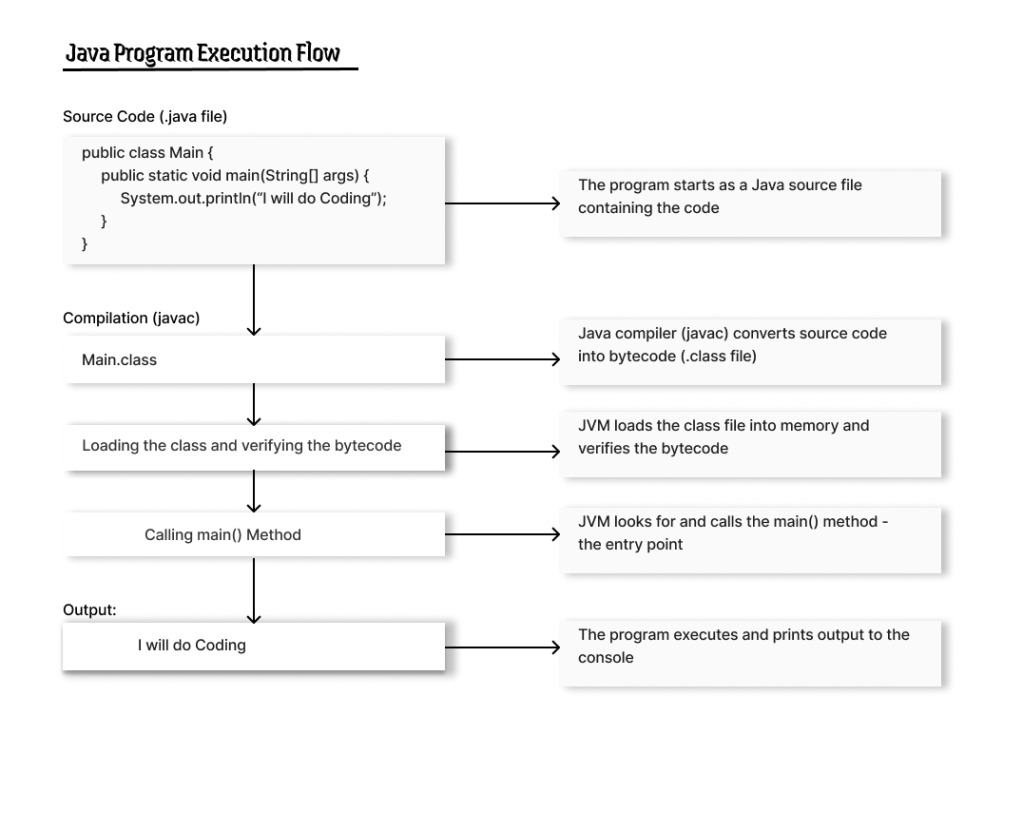
Why is This Process Important?
This process helps to understand:
- Why Errors Happen: Knowing these steps helps you fix issues during compilation or execution.
- Java’s Strength: It shows why Java programs can run on any computer with a JVM.
- How Computers Work: You’ll see how your instructions turn into actions the computer can follow.
Summary
- HLL vs. MLL: Humans write programs in High-Level Languages (HLL), while computers understand Machine Language (MLL).
- Execution Flow Steps: Write code, save it, compile to bytecode, load it, execute it, and see the output.
- Why It’s Important: Helps debug issues, understand Java’s platform independence, and learn how computers execute programs.
Conclusion
Now you know how a Java program runs, from writing code to seeing the output. Isn’t it amazing how a few lines of code can turn into actions a computer understands?
Learning programming is like mastering a skill step by step. The more you practice, the better you get. Spyde’s Blog is here to make this journey smooth and fun. Let’s keep growing and creating something incredible together!


Leave a comment